

Monday, 29 February 2016
05:53:00
Learn about SUPERGLOBAL ARRAYS in PHP

Currently, two sets of built-in arrays contain the same information. One set of arrays, introduced in PHP 4.1.0, are called superglobals or autoglobals because they can be used anywhere, even inside a function. The older arrays, with long names such as $HTTP_SERVER_VARS, must be made global before they can be used in an array. Unless you’re using an old version of PHP, use the newer arrays, those whose names begin with an underscore (_). The older arrays should be used only when you’re forced to use a version of PHP older than PHP 4.1.0.
A new php.ini setting introduced in PHP 5 allows you to prevent PHP from automatically creating the older, long arrays. It’s very unlikely that you will need to use them, unless you’re using some old scripts containing the long variables. The following line in php.ini controls this setting:
register_long_arrays = On
At the current time, this setting is On by default. Unless you’re running old scripts that need the old arrays, you should change the setting to Off so that PHP doesn’t do this extra work.
Although the setting is currently On by default, that could change. The default setting might change to Off in a future version. If you’re using some old scripts and getting errors on lines containing the long arrays, such as $HTTP_GET_ VARS, check your php.ini setting for long arrays. It might be Off, and the long arrays needed by the older script are not being created at all.
The built-in arrays are listed in Table 6-2, along with a short description. The use of specific arrays is described in detail in this book where the related subjects are described.
05:42:00
How To Get Result From multidimensional arrays
Walking through a multidimensional array
You can walk through a multidimensional array by using foreach statements (described in the section “Walking through an Array,” earlier in this chapter). Because a two-dimensional array, such as $foodPrices, contains two arrays, it takes two foreach statements to walk through it. One foreach statement is inside the other foreach statement. (Putting statements inside other statements is called nesting.)
The following statements echo the values from the multidimensional array:
foreach ( $foodPrices as $category ) {
  foreach ( $category as $food => $price ) {
      $f_price = sprintf(“%01.2f”, $price); echo “$food: \$$f_price \n”;
} }
The output is the following:
onion: $0.50
potato: $1.00
apple: $2.50
orange: $2.00
bacon: $3.50
ham: $5.00
Here is how PHP interprets these foreach statements:
2. The first key/value pair in the $category array is retrieved. The key is stored in $food, and the value is stored in $price.
3. The value in $price is formatted into the correct format for money.
4. One row for the product and its price is echoed.
5. The next key/value pair in the $category array is reached.
6. The price is formatted, and the next row for the food and its price is echoed.
7. Because there are no more key/value pairs in $category, the inner foreach statement ends.
8. The next key/value pair in the outer foreach statement is reached. The next value is put in $category, which is an array.
9. The procedure in Steps 1 through 8 is repeated until the last key/value pair in the last $category array is reached. The inner foreach statement ends. The outer foreach statement ends.
In other words, the outer foreach starts with the first key/value pair in the array. The key is vegetable, and the value of this pair is an array that is put into the variable $category. The inner foreach then walks through the array in $category. When it reaches the last key/value pair in $category, it ends. The script is then back in the outer loop, which goes on to the second key/value pair . . . and so on until the outer foreach reaches the end of the array.
Wednesday, 10 February 2016
02:22:00
The PHP IDE for Linux only
PHP IDE for Linux only
The best IDE for PHP on linux is Coffeecup Editor as given below:Color editor gvim for PHP (Win and linux) at
http://metalab.unc.edu/LDP/HOWTO/Vim−HOWTO.html and see also ptags of PHP
·
· PHP editor http://www.coffeecup.com/select/editor.html (rating 5 stars).
· HTML/PHP editors Quanta http://quanta.sourceforge.net
· HTML/PHP editors Blue Fish http://bluefish.linuxave.net
· HTML editors AswEdit http://www.advasoft.com
02:21:00
PHP IDE for both MS Windows and Linux
PHP IDE for both MS Windows and Linux
PHP IDE/editor for bot MS Windows and Linux platforms are :PHP editor (for both windows and linux/UNIX) http://www.coffeecup.com/select/editor.html (rating
5 stars).
· HTML/PHP editors Amaya http://www.w3.org/Amaya
· Folding text editor (Win and linux) http://fte.sourceforge.net
· PHP Editor (Win and linux) http://www.scintilla.org
Color editor gvim for PHP (Win and linux) at
http://metalab.unc.edu/LDP/HOWTO/Vim−HOWTO.html and see also ptags of PHP
·
· Jed (win and linux) http://space.mit.edu/~davis/jed.html
· Editors for PHP : http://www.itworks.demon.co.uk/phpeditors.htm
· Editors for PHP : http://www.oodie.com/tools/index.php?view=editor
02:19:00
Best PHP IDE for MS Windows only
PHP IDE for MS Windows only
PHP IDE/editor on MS Windows platform are :Rated 1st (the best PHP tool on MS Windows) : PHPTriad is a complete PHP development and server
environment for Windows. It installs PHP, Apache, MySQL, and PHPMyAdmin, both installing and
setting up the environment. PHPTriad is at http://www.phpgeek.com/phptriad.php and at mirrorsite
·
· Rated 2nd : PHP Coder http://www.php−ide.com
· Rated 3rd: PHPEd (Soyal), an excellent PHP editor (MS Windows) http://soysal.free.fr/PHPEd
· IDE for PHP editor (MS Windows): http://www.phpedit.com
Color editor gvim for PHP (Win and linux) at
http://metalab.unc.edu/LDP/HOWTO/Vim−HOWTO.html and see also ptags of PHP
·
· IDE for PHP (MS Windows) http://www.pc−service−boerner.de/PHPScriptEditor.htm
· "EditPlus Text editor" win32 http://www.editplus.com (high rating 5 stars)
· eNotepad win32 http://www.edisys.com/Products/eNotepad/enotepad.asp (high rating 5 stars)
· PHP editor win32 http://www.chami.com/html−kit (high rating 5 stars)
UltraEdit win32 http://www.ultraedit.com with PHP word file at
http://www.ultraedit.com/downloads/additional.html
·
· ScriptWorx editor win32 http://www.softlite.net/products/scriptworx (rating 4.5 stars)
· TextPad editor win32 http://www.textpad.com (rating 4.5 stars)
PHP editor "ASPEdit" http://www.tashcom.com/aspedit (rating 3.5 stars) along with PHP code
explorer http://www.tashcom.com/codex (rating 4.5 stars)
And the last and Mostly used
· Code−genie editor similar to UltaEdit or TextPad but smaller in size http://www.code−genie.com
· HTML/PHP editor Dreamweaver http://www.dreamweaver.com
· HTML/PHP editor Homesite http://www.allaire.com/homesite
· HTML/PHP editor Hotdog http://www.hotdog.com
01:15:00
Learn About PHP Classes and PEAR IN PHP
Visit the following web sites which have large collections of ready to use PHP class libraries.
· PHP classes are at http://phpclasses.upperdesign.com.
PEAR (PHP Extension and Application Repository) is a code repository for PHP extensions and
PHP library code similar to PERL's CPAN and is at http://pear.php.net and mirror linux
php−pear−rpms and pear−tutorials.
·
ADODB (Active Data Objects Data Base) http://php.weblogs.com/ADODB : PHP's database access
functions are not standardised. Every database extension uses a different and incompatibile API. This
creates a need for a database class library to hide the differences between the different databases
(encapsulate the differences) so we can easily switch databases. ADODB currently support MySQL,
PostgreSQL , Interbase, Oracle, MS SQL 7, Foxpro, Access, ADO, Sybase and generic ODBC. See
also ADODB−manual. The PhpLens is based on ADODB.
·
Metabase (Database independent access and management)
http://phpclasses.upperdesign.com/browse.html/package/20
·
· PHP Hot scripts http://www.hotscripts.com/PHP
· Very popular PHP resources http://php.resourceindex.com and CGI−Resources
· PHP projects are at http://php.net/projects.php
· PHP Lib Netuse http://phplib.netuse.de (This is deprecated, merged with PEAR)
· PHP widgets http://www.northern.ca/projects/phpwidgets
· Generic Framework PHP4 http://sourceforge.net/projects/gpfr
· Source Forge PHP Lib http://phplib.sourceforge.net
· Source Forge PHP Snippets, go and click on PHP here http://sourceforge.net/snippet
· E−gineer PHP lib http://e−gineer.com/articles/php−hacker
· FAQ PHP http://php.faqts.com
· PHP Lib http://px.sklar.com
· PHP Factory http://alfalinux.sourceforge.net/phpfact.php3
· PHP Builder site http://phpbuilder.com/snippet
· PHP developer http://www.phpdeveloper.org
· PHP newbie http://www.newbienetwork.net
· PHP walrus http://www.evilwalrus.com
01:11:00
What Are PHP Libraries And Learn More
PHP Libraries
The PHP is a object−oriented scripting language. Hence PHP code is "classes, classes, classes and classes".When you write PHP code you must design your classes such that they are re−usable or they use existing PHP
classes.
There are hundreds of PHP classes already written and ready to use. There are classes for accessing
databases, classes for generating XML, HTML forms, classes for creating tables, forms and other HTML
objects. If you write some generic classes then please upload to sites. By year 2005, there will be more than
hundred million re−usable PHP classes. Advantage of PHP classes are they provide − data hiding, inheritance,encapsulation, reliability, reusability and polymorphism. The most important PHP sites are PHP classes and
PEAR
01:08:00
About XML/XSLT Publishing Engine
XML/XSLT Publishing Engine
Krysalis is the XML/XSLT publishing engine, inspired from Cocoon but adapted to the PHP technology.InterAKT has developed Krysalis to achieve what the next generation of web services have to offer − the
complete separation of the information, application logic and presentation layer.
Krysalis is an open−source PHP development platform, based on the XML/XSLT core. It reused most of
PHAkt code to create the Krysalis taglib library.
Major features are:
· Dynamic XML support.
· Dynamic PDF generation.
· Sitemap description with regular expressions.
· PXP page caching.
· Multiple transformation pipelines.
· Multiple connection types to various databases (ADODB).
Please visit the Krysalis site for more information http://www.interakt.ro/products/Krysalis.
01:05:00
Learn about SOAPX4 and PhpXMLP?
SOAPX4 and PhpXMLP
SOAP is an XML−based protocol for messaging and RPC−style communication between two processes. The
World Wide Web Consortium's XML Protocol (XP) Working Group is working on a SOAP standard, which
will be called XP.
The SOAPX4 (Simple Object Access Protocol) implementation for PHP is at
Alternate SOAP implementation is at http://sourceforge.net/projects/phpxmlp.
Learn more about:
01:02:00
A Simple Example Of PHP
Suppose you have a form
?>
It's that simple! PHP automatically creates a variable for each form input field in your form. You can then use
these variables in the ACTION URL file.
The next step once you have figured out how to use variables is to start playing with some logical flow tags in
your pages. For example, if you wanted to display different messages based on something the user inputs, you
would use if/else logic. In our above example, we can display different things based on the age the user
entered by changing our display.html to:
<?php
if($age>50);
echo "Hi $name, you are ancient!<p>";
elseif($age>30);
echo "Hi $name, you are very old!";
else;
echo "Hi $name.";
endif;
?>
PHP give a very powerful scripting language which shall do much many more than what the above simple
example demonstrates. See the section on the PHP Script Language for more information.
You can also use PHP to configure who is allowed to access your pages. This is done using a built−in
configuration screen. With this you could for example specify that only people from certain domains would be
allowed to see your web pages, or you could create a rule which would password protect certain pages. See the
Access Control section for more details.
PHP is also capable of receiving file uploads from any RFC−1867 compliant web browser. This feature lets
people upload both text and binary files. With PHP's access control and logical functions, you have full
control over who is allowed to upload and what is to be done with the file once it has been uploaded. See the
File Upload section for more details.
PHP has support for the PostgreSQL database package. It supports embedded SQL queries in your .HTML
files.
PHP also has support for the mysql database package. It supports embedded SQL queries in your .HTML
files.
- <FORM ACTION="/cgi−bin/php.cgi/~userid/display.html" METHOD=POST>
- <INPUT TYPE="text" name="name">
- <INPUT TYPE="text" name="age">
- <INPUT TYPE="submit">
- <FORM>
<php echo "Hi $ name, you are $ age years old!";?>
It's that simple! PHP automatically creates a variable for each form input field in your form. You can then use
these variables in the ACTION URL file.
The next step once you have figured out how to use variables is to start playing with some logical flow tags in
your pages. For example, if you wanted to display different messages based on something the user inputs, you
would use if/else logic. In our above example, we can display different things based on the age the user
entered by changing our display.html to:
<?php
if($age>50);
echo "Hi $name, you are ancient!<p>";
elseif($age>30);
echo "Hi $name, you are very old!";
else;
echo "Hi $name.";
endif;
?>
PHP give a very powerful scripting language which shall do much many more than what the above simple
example demonstrates. See the section on the PHP Script Language for more information.
You can also use PHP to configure who is allowed to access your pages. This is done using a built−in
configuration screen. With this you could for example specify that only people from certain domains would be
allowed to see your web pages, or you could create a rule which would password protect certain pages. See the
Access Control section for more details.
PHP is also capable of receiving file uploads from any RFC−1867 compliant web browser. This feature lets
people upload both text and binary files. With PHP's access control and logical functions, you have full
control over who is allowed to upload and what is to be done with the file once it has been uploaded. See the
File Upload section for more details.
PHP has support for the PostgreSQL database package. It supports embedded SQL queries in your .HTML
files.
PHP also has support for the mysql database package. It supports embedded SQL queries in your .HTML
files.
Tuesday, 9 February 2016
03:59:00
How To Debug with FILE and LINE in PHP?
Debug with FILE and LINE
To debug php applications create a file "debug2.inc" Having the following functions :<?php
/* outline this variable, to restrict double statement. */ if (!defined("_DEBUG2_DEFINED_")) { define("_DEBUG2_DEFINED_", 1 ); } else return; // if this file is already included then return
# file name : debug2.inc # Functions for debuging the PHP source code #*****************************************************************
# Copyright policy is GNU/GPL but additional request is # that you include author's name and email on all copies
# Author : Al Dev Email: alavoor[AT]yahoo.com #*****************************************************************
# Usage of this functions − # In your source code put something like − # debug2_(__FILE__, __LINE__, "f_somevariable", $f_somevariable);
# And this will generate output in debug.out file.
//function debug2_($fname, $lname, $debug_var, $debug_value=0) {}
// Give read, exec for all on directory /debug2_logs // chmod a+rwx /debug2_logs // But here you need to open the file in append mode. $fp_debug2 = fopen("/debug2_logs/debug.out", "a"); if ($fp_debug2 == false) { print "<b>File open failed − global.var.inc<b>"; exit; }
function debug2_($fname, $lname, $debug_var, $debug_value=0) { global $fp_debug2;
//print "<br> debug_value is : $debug_value <br>"; if (!$debug_value) { fwrite($fp_debug2, "\n ". $fname ." ". $lname .": $debug_var"); } else { fwrite($fp_debug2, "\n ". $fname . " ". $lname .": $debug_var = $debug_value"); } //print "<br> f_cookie is : $f_cookie <br>"; }
// In your first page, which is generally index.php3 // truncate the debug2_logs file in beginning of code function init_debug_file() { global $fp_debug2;
$fp_debug2 = fopen("/debug2_logs/debug.out", "w"); if ($fp_debug2 == false) { print "<b>File open failed − global.var.inc<b>"; exit; } system("chmod a+rwx /debug2_logs/debug.out"); }
?>
In your PHP source code initial page which is generally index.php3, put a line like
<?php include ("debug2.inc");
init_debug_file(); // all other commands follows here ... // ........... ?>
To output debug values, in your PHP source code files, put debug2_() calls as illustrated below:
<?php
include ("debug2.inc"); debug2_(__FILE__, __LINE__, "f_somevariable", $f_somevariable);
function aa() { $aa = 8; debug2_(__FILE__, __LINE__, "aa", $aa); } ?>
When you run the PHP program the output will be traced in the file called debug.out giving the filename, linenumber, variable name and it's value.
Use the debug2_() generously in your code. The usage of debug2_() calls in your program will NOT have any impact on the final production code and also has no impact on the performance because they will be filtered out as described below. You can use copy and paste to save time of typing debug2() calls or use the 'yank to buffer' feature of Vi editor and paste.
When you are done development and testing and when you are ready to deploy on the production server, filter out the debug2_ calls from your source code. At UNIX prompt −
bash$ mkdir production bash$ grep −v debug2_ filea.php3 > production/filea.php3
For a large group of files −
bash$ mkdir production bash$ ls *.php3 | while read ans do grep −v debug2_ $ans > production/$ans done
And now copy the files from production to the deployment area.
03:54:00
Debugging in PHP

Debugging PHP
You can use one of the following debuggers.List of PHP debuggers :
http://download.php.net/manual/en/debugger.php.
• http://dd.cron.ru/dbg
• Zend−IDE has PHP debugger http://www.zend.com/store/products/zend−ide.php
• Soysal editor has PHP debugger http://www.soysal.com/PHPEd
• APD (Advanced PHP Debugger) http://apd.communityconnect.com
• PHP symbolic debugger http://members.ozemail.com.au/~djf01/body.html and at http://freshmeat.net/projects/body−phpdebugger
• Cross−platform IDE : Activestate Komodo http://www.activestate.com/Products/Komodo
• The PHP Symbolic Debugger called Body
• PHP Debugger called 'phpCodeSite' is available at http://phpcodesite.phpedit.com and see also Appendix C
• Code crusader http://www.newplanetsoftware.com/jcc
• PHP Debugger is available at http://www.phpdebug.com
03:44:00
Learn About PHP documenter (like Javadoc)
PHP documenter (like Javadoc):
The phpDocumentor is a script for creating documentation from comments in php code. It is at http://phpdocu.sourceforge.net.
The Doxygen documentation system can be used along with this Doxygen PHP PERL script
Download Doxygen and the PERL script from download page. PHPXref is a small PERL script to make working with the source code of a large PHP site somewhat easier. Cross references functions, variables and database tables defined and used across your various PHP files Generates documentation for each function defined in the PHP files by utilizing formatted comments placed next to each function The output is a tree of HTML files that can be downloaded and browsed on a local machine without having to setup a web server, etc. It is at
http://phpxref.sourceforge.net.
03:42:00
Learn About ASP To PHP Converter
ASP To PHP Converter − Migration From ASP2PHP
After installing PHP, you may want to migrate all the Microsoft ASP programs to PHP.
Convert Microsoft ASP scripts to PHP − ASP2PHP
To convert ASP scripts to PHP use this utility
http://asp2php.naken.cc
See also http://www.asp2php.com
ctags for PHP
Tags are totally useful and are used for navigation of source code throughout the editors like vi, emacs, CRiSP, NEdit and so on...
If you happen to had programmed loads in C, C++ or Java you might have used the ctags program to create tags. To peer the net handbook web page, form 'man ctags' at linux/UNIX bash immediate. The modern variation of ctags supports personal home page language and is on hand from http://ctags.Sourceforge.Internet.
Notice: don't use the ptags given beneath but alternatively use the contemporary ctags which helps PHP language. The application under is just a pastime and sample and was once created when older models of ctags didn't aid php. The list below is kept for historical reasons (a musuem).
The ptags program for personal home page is given below, which you should use to create the tags for php supply code. Your productivity will give a boost to 3 to four occasions in case you use ptags.
See also Vim color text editor for personal home page, C, C++ at http://metalab.unc.edu/LDP/HOWTO/Vim−HOWTO.html
// Save this file as ptags.cpp and compile by //              g++ −o ptags ptags.cpp //***************************************************************** // Copyright policy is GNU/GPL but additional request is // that you include author's name and email on all copies // Author : Al Dev Email: alavoor[AT]yahoo.com // Usage : ptags *.php3 *.inc //                 This will generate a file called tags //***************************************************************** #include <iostream.h> #include <fstream> #include <stdio.h> // for sprintf #include <stdlib.h> // for system #include <string.h> // for memset #include <ctype.h> // for isspace

#define BUFF_LEN  1024 #define LOCATION  9

char *ltrim(char *dd); char *rtrim(char *ee);

main(int argc, char **argv) {        if (argc < 2)        {                cerr << "\nUsage: " << argv[0] << " file .... " << endl;

          exit(0);        }

        char fname[100] = "tag_file.out";        FILE    *fpout;        ofstream    fout(fname);        if (fout.fail())        {                cerr << "\nError opening file : " << fname << endl;                exit(−1);        }        //fpout = fopen(fname, "w");

        for (int ii = 1; ii < argc; ii++)        {                /*                char buff[2024];

                sprintf(buff, "\\rm −f %s; ls %s > %s 2>/dev/null", outfile, argv[1], outfile);                cout << "\nbuff = " << buff << endl;

                system(buff);                fclose(fp);                */                FILE *fpin = NULL;                fpin = fopen(argv[ii], "r");                if (fpin == NULL)                {                        cerr << "\nError opening file : " << argv[ii] << endl;                        exit(−1);                }                char buff[BUFF_LEN + 100];                memset(buff, 0, BUFF_LEN +10);                for ( ; fgets(buff, BUFF_LEN, fpin) != NULL; )                {                        char aa[BUFF_LEN + 100];                        char aapointer[BUFF_LEN + 100];                        memset(aa, 0, BUFF_LEN +10);                        strcpy(aa, buff);                        strcpy(aapointer, ltrim(aa));                        strcpy(aa, aapointer);

                        // Remove the trailing new line..                        {                                int tmpii = strlen(aa);                                if (aa[tmpii−1] == '\n')                                        aa[tmpii−1] = 0;                        }                        //cout << "aa is : " << aa << endl;                        //cout << "aapointer is : " << aapointer << endl;                        if (strncmp(aa, "function ", LOCATION) != 0)                                continue;                        //cout << buff << endl;

                        // Example tags file output is like −                        // al2  al.c    /^al2()$/;"     f                        {                                char bb[BUFF_LEN + 100];                                memset(bb, 0, BUFF_LEN +10);                                strcpy(bb, & aa[LOCATION]);                                char *cc = bb;                                while (cc != NULL && *cc != '(')


 *cc++;                                *cc = 0;                                cc = rtrim(bb);                                //cout << "bb is : " << bb << endl;                                //cout << cc << "\t" << argv[ii] << "\t" << "/^" << aa << "$/;\"\tf" << endl;                                fout << cc << "\t" << argv[ii] << "\t" << "/^" << aa << "$/;\"\tf" << endl;                                //fprintf(fpout, "%s\t%s\t/^%s$/;\"f\n", cc, argv[ii], aa );                        }

                        memset(buff, 0, BUFF_LEN +10);                }                fclose(fpin);        }        fout.flush();        fout.close();        //fclose(fpout);

        // Sort and generate the tag file        {                char tmpaa[1024];                sprintf(tmpaa, "sort %s > tags; \\rm −f %s", fname, fname);                system(tmpaa);        } }

char *ltrim(char *dd) {    if (dd == NULL)        return NULL;

    while (isspace(*dd))        dd++;

        return dd; }

char *rtrim(char *ee) {    if (ee == NULL)        return NULL;

        int tmpii = strlen(ee) − 1;        for (; tmpii >= 0 ; tmpii−−)        {                if (isspace(ee[tmpii]) )                {                        //cout << "\nis a space!!" << endl;                        ee[tmpii] = 0;                }        }        return ee; }
03:31:00
GET SQL Server For Microsoft
SQL server for Microsoft
SQL server can be on a seperate box which need not be running MS Windows. You also need a SQL server for doing web development. I recommend that you install Redhat Linux on a very old PC like (Pentium or 486 box) and install the PostgreSQL RPMs on it. You do not need any windows graphics for a database server and at console mode startup the PostgreSQL server. PostgreSQL is about 3 times faster than Oracle or MS SQL server.
The PostgreSQL support code for PHP was written by Adam Sussman asussman@vidya.com
You can also order ready−to−go cheap Linux boxes from −
Egghead Egghead, click on Auctions and Linux boxes, you get best deals in live Auctions.• Goto LinuxHardware and click ComputerSystems, LinuxOnline, Linux hardware Crynwr, Linux HarwareNet • US Land5, US QLiTech, US CompaqLinux, US VAlinux, US StoreAnywhere• In Europe : UK GBdirect, UK MultiT, Hungary Leonardo, Belgium Mind, Germany Spier• DEC alpha linux DECalpha and CompaqAlphaLinux•
You can also get PostgreSQL for Windows NT/2000 from http://www.askesis.nl.
03:21:00
How to Download Install And RUN PHP?
Step 1 Personal home page runs on Microsoft home windows!!
personal home page initially began on UNIX platform, however it is vitally transportable and runs on MS home windows and MS IIS webserver. In these days php has a significant person base on MS windows 2000/NT/ninety five/ninety eight, you will discover a tremendous assortment of instruments for personal home page below MS home windows platform.
Many Hypertext Preprocessor programmers enhance code on MS home windows and set up on gigantic linux servers like IBM mainframe strolling linux, Compaq DEC Alpha and solar sparc.
A great skills is that considering the fact that personal home page also runs on UNIX/Linux, developers on UNIX platform "cash on" the consumer base of personal home page underneath MS home windows because the Hypertext Preprocessor code developed below MS windows can be used on UNIX/linux without any code trade!!
personal home page itself is written in 100% "C" langauge, and thus it runs on an extraordinarily broad style of platforms like BeOS, UNIX, MS windows, Apple Macintosh, IBM OS/2 and on many more operating programs.
personal home page could be very speedy and is much rapid than Java. For net development, overlook Java/JSP, it's Hypertext Preprocessor, Hypertext Preprocessor and personal home page in every single place!! Personal home page is also becoming a common purpose object oriented scripting language
Step 2 Hypertext Preprocessor down load
Hypertext Preprocessor important web site http://www.Personal home page.Internet• personal home page resources http://ils.Unc.Edu/web−db/personal home page/hyperlinks.Html• php Code alternate − http://px.Sklar.Com• Vex web http://www.Vex.Internet/personal home page•
replicate web sites are in many international locations like www.COUNTRYCODE.Php.Internet, the place COUNTRYCODE is like us, fe, sk and many others.
• http://www.Fe.De.Personal home page.Net
• http://www.Sk.Hypertext Preprocessor.Web
• http://php.Iquest.Web/
Step 3
PHP installation On
Microsoft windows ninety five/ninety eight/NT/2000
php is IMMENSELY general on Microsoft windows platform and is particularly extra fashionable than Microsoft's own ASP net scripting language!! A most important reason for popularity is that Hypertext Preprocessor is a object oriented scripting language whereas ASP is not. Personal home page has a enormous assortment of re−usable lessons (objects). Php runs lot faster than ASP on MS home windows and has extra facets and functionalities than Microsoft ASP. Hypertext Preprocessor is way more strong, riskless and powerful than ASP. And the person base of php is tremendously massive when you consider that Hypertext Preprocessor runs on MS windows, Linux, Mac OS and all UNIX'es. Greatest talents of Hypertext Preprocessor is that you may boost on MS windows and set up on Linux or UNIX and vice versa!!
There are extra php users underneath MS Windows98/NT/2000 than on any other running process!! Due to the fact there is a lot demand for Hypertext Preprocessor on MS home windows 98/NT/2000, a competent to install executable is made and you comfortably double−click on on the exe file to robotically set up php in just 2 minutes. Download the Hypertext Preprocessor executable install file from
MS windows exe installer for Hypertext Preprocessor
http://php.Weblogs.Com/easywindows
• plenty of info on personal home page on MS home windows platform
http://php.Weblogs.Com
• set up and config of Hypertext Preprocessor on MS home windows
http://www.php.Net/manual/install−windows95−nt.Hypertext Preprocessor
• Hypertext Preprocessor Triad installs a whole php server atmosphere on windows systems http://www.phpgeek.Com
Apache Webserver Quick−Install (10 seconds) on Microsoft Windows 95/98/NT/2000
You need a web−server to run the PHP on MS Windows. You can use MS IIS web server or you can use free Apache web−server for MS Windows 95/98/NT/2000. To save you lot of time here is the ready−to−install setup.exe file for apache for Windows platform:
PHPTriad which is Apache+PHP+MySQL single package is at http://www.phpgeek.com/phptriad.php and at mirrorsite. I very strongly recommend PHPTriad as it is immensely popular among MS Windows users (millions of downloads).
Apache binaries − http://httpd.apache.org/dist/httpd/binaries/win32
03:18:00
How to do with PHP?
Python is "just right" however there are no C like brackets/braces which might be useful for code navigation in vi editor. It's like your hand is broken in the event you are not able to navigate quickly the supply code utilizing vi/emacs editor's search braces/brackets commands. Hypertext Preprocessor is technologically extra developed than Python.
Hypertext Preprocessor is the nice because it is object oriented and has the excellent aspects of C/C++/Java/PERL/Python. It can substitute PERL, Python, Java, C, C++, awk, Unix shell scripting, MS visual basic and others!! Hypertext Preprocessor runs direct and PHP is written in C.
each and every computer programmer is aware of why personal home page is the fine. Ask your neighborhood pc programmer.
only Hypertext Preprocessor will succeed in the 21st and twenty second century and past!• Why do believe every PERL, Python and Java programmers are flocking to PHP ?? There is a very robust intent. • every man or woman on the planet needs personal home page. PHP blast is inflicting shock−waves world wide!!• the sector is dominated by using personal home page. There's Hypertext Preprocessor in every single place and at any place... Personal home page, personal home page, PHP in every single place.. •
personal home page was saved the "high secret and strictly exclusive" pc language by many firms in the world, however now had grow to be probably the most good−known and most generally used object oriented scripting language for net, web, e−commerce, general rationale and trade−to−industry initiatives. Even today many competing corporations maintain PHP language as a highly private matter now not disclosing to outsiders (rivals).
Hypertext Preprocessor will storm the entire world and can take the IT enterprise by means of shock!! The vigour of PHP is that it's pass−platform and runs far and wide!! It runs on Linux, windows ninety five/98/NT/2000/XP, Solaris, HPUX and all flavors of UNIX. Hypertext Preprocessor is write once and installation at any place and far and wide. It runs on many web−servers like Apache, Microsoft IIS, etc..
PHP runs 5 to 20 times turbo than Java!! In exact benchmarks, Hypertext Preprocessor was about three.7 times faster than JSP (see benchmarks ). Personal home page is enormously effortless to make use of and that you may develop very elaborate net/e−commerce/basic−standalone purposes very quickly in an extraordinarily short period of time. Establishing applications in PHP is ready TWO occasions faster than establishing in programming language like Java (considering that there is not any need for compilation in PHP). (In future Hypertext Preprocessor language will imitate most elements of Java language and Java programmers will love personal home page. And personal home page will have java key terms like class, extends, interface, implements, public, covered, private and many others..).
It has object oriented points and takes the best aspects from Java, C++, PERL and "C" languages. Hypertext Preprocessor language is a wedding of great facets from Java, C++, PERL, Python and C.
personal home page is the true gem of the entire scripting/programming languges and can soon grow to be the "MECCA" for programmers world−vast!! Personal home page has a massive person base and a big developer base as it runs on each Window95/NT/2000/XP and all flavors of UNIX'es.
A significant shock is ready for us − Most most of the time personal home page would be the scripting language of the twenty first century!!
personal home page will also be compiled and optimized to make it run even turbo by using utilizing the Zend Optimizer. Zend optimizer is integrated with Hypertext Preprocessor in personal home page variation 4.0. First, you'll write your software in personal home page scripting language during development, testing and debugging. As soon as the task is capable for deployment you're going to use the Zend compiler to collect the PHP to create executable in an effort to run very speedy.
you could almost always use a combo of Hypertext Preprocessor (70% code) + HTML/DHTML/XML (25% code) + Javascript (5% code customer facet validations) on your e−commerce initiatives.
03:14:00
What is PHP An Introduction to PHP?
Definition: personal home page is a straightforward, object−oriented, interpreted, robust, relaxed, very high−performance, structure impartial, portable, dynamic scripting language. PHP has "type" key phrase much like Java's "classification" keyword. And PHP is designed such that it is 5 times faster than Java, due to the fact that there is not any virtual computer. Hypertext Preprocessor may be very quick becoming a regular, general purpose, object oriented scripting language. PHP just isn't only meant for internet purposes but also can be utilized for constructing basic applications.
Hypertext Preprocessor is the subsequent large thing after HTML considering the fact that in these days no person writes static HTML however uses PHP (generate on the fly, embedded dynamic HTML). PHP 'type−of' supercedes "static HTML". Personal home page is an extraordinarily strong scripting language. Personal home page will overtake PERL/Python and can substitute PERL/Python. Hypertext Preprocessor is the next−iteration PERL/Python scripting. PHP can do some thing PERL or Python does and surely does rather more, a lot better and far, a lot cleaner.
Personal home page stands for 'Hypertext Pre−Processor' and is a server facet HTML scripting/programming language. Personal home page is C−like internet scripting language runs on Apache, Netscape/iPlanet, and Microsoft IIS web servers. Personal home page is a instrument that allows you to create dynamic web pages. Hypertext Preprocessor−enabled web sites are handled identical to regular HTML pages and you can create and edit them the equal way you most commonly create average HTML pages. Hypertext Preprocessor lets you write simple scripts right to your HTML documents very similar to JavaScript does, besides, unlike JavaScript PHP just isn't browser−dependant. JavaScript is a consumer−part html−embedded language while personal home page is a server−aspect language. Hypertext Preprocessor is identical in concept to Netscape's LiveWire pro product and Microsoft's ASP and sun Microsystem's JSP.
PHP will not be handiest used for developing web purposes, but additionally for creating basic standalone purposes.
Hypertext Preprocessor's strength are :
personal home page is the most sophisticated technology. Other technologies PERL, Python, Tcl, VB script, ASP are older and inferior applied sciences. Even Java/JSP is not so good as PHP.
•
Open source• with no trouble discovered syntax• huge database connectivity• gigantic library of contributed extensions• basic reason scripting language much superior to PERL, VB script, ASP, JSP.•
Why personal home page ? PHP is the great on the grounds that of the following factors:
PERL is the "ancestor" of PHP and PERL is used for an awfully very long time (more than 25 years historical?). PHP has an abilities over PERL − Hypertext Preprocessor supports customer−side code and is easier to compile into a executable. User base of PERL is very huge. Hypertext Preprocessor tries to mimic PERL and complement the PERL science. PERL programmers like PHP! Personal home page is sincerely a "cutting-edge PERL", but with an extra identify referred to as "Hypertext Preprocessor".
•
Java is object−oriented however could be very slow. Java packages run very sluggish. Also Java is immensely elaborate and sophosticated technology (has many layers like JVM, JIT compiler and others). And complexity and sophostication results in problems. If there may be Linux on server−aspect then why do you want Java in servers ? And Java is extra like a procedure programming language and it's rapid to enhance in scripting languages (like Hypertext Preprocessor).
01:40:00
What Is Google Chrome?
Google Chrome
Chrome is an internet browser formally released through Google on December 11, 2008. It is a preferred substitute to other browsers, corresponding to Microsoft internet Explorer and Mozilla Firefox. Some of the browser's features incorporate browser sync, tabbed shopping, translation, spell investigate, resize type text containers, Omnibox, and rather more.
The Chrome browser is a gentle-weight browser, that means it does not come pre-loaded with a bunch of add-ons or plug-ins. However, many exclusive varieties of add-ons and plug-ins will also be downloaded and mounted in the Chrome browser for introduced elements and functionality.
After being installed, the Chrome browser is routinely configured to down load and install updates when available. To confirm updates are being hooked up automatically, see our page on tips on how to update your browser.
01:35:00
How To Backup Your Facebook photos, videos, and text.

facebook presents all its users the capacity to backup their photographs, videos, and text.
- click on Account and go to Account Settings.
- click the gain knowledge of extra option subsequent to down load Your understanding.
- click on the download button.
- you are going to then be caused with a message indicating that it takes some time to gather all your knowledge. As soon as that expertise is competent for download you'll be despatched an email with a hyperlink to a compressed .Zip file containing your entire personal information.
Bonus Tip: you can also setup an IFTTT recipe to mechanically backup any snapshot you've gotten been tagged in on facebook.
the net carrier if this then that (IFTTT) is a excellent free on-line provider that permits you setup duties a good way to occur when an extra exact venture happens. For illustration, if the climate for your field reviews that it's going to rain you might setup an if this then that recipe to ship a text message to your telephone to percent an umbrella. This services works with dozens of alternative trendy on-line services including Craigslist, fb, Twitter, Dropbox, Gmail, Flickr, Foursquare, and many more. Below is an inventory of one of the most preferred recipes presently listed on the site.
- every time you are tagged in a photograph on fb, it's going to be sent to Dropbox
- Greet new twitter follower
- text to escape (ship a textual content to have a cellphone call to escape what you are doing)
- Google Plus to Twitter
- If I upload a snapshot to fb then also upload that picture to Picasa
- take-heed call
- retailer my electronic mail attachments to Dropbox
- appoint Reminder
- Get an SMS alert before any occasion starts for your Google Calendar
consult with iftt.Com to setup your own recipes
01:30:00
How To Create a unique Profile Pic For Facebook?

Create a targeted fb profile photo
on the high of your facebook profile, you'll see the 5 most latest snap shots containing a snapshot of you. You can use this element of your profile to make a extra distinct and normal profile snapshot through extending the important profile image into these contemporary pics. As noticeable in the photograph this profile takes a better photo and spreads it from the profile photo into the contemporary pictures across the highest.
These profile photos will also be achieved using the free percentScatter online instrument. With this device, that you can add any photograph and adjust the photograph to be shown within the profile section, the top 5 pix, and even the wall.
become aware of: When making use of this system any time you or a pal tags you in a photograph it is going to be posted in the high portion of your profile ruining this outcomes. To preserve this result, cover any new picture by using clicking the x that appears when hovering the mouse in the top right-nook of the picture.
01:27:00
Control Facebook With Keyboard
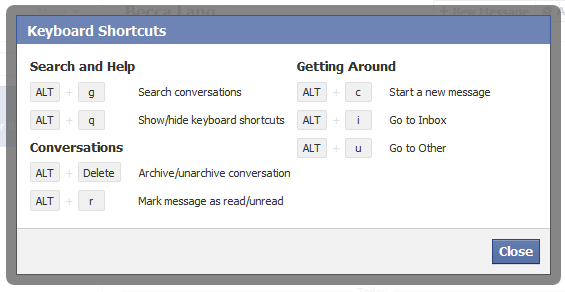
fb keyboard shortcuts
earlier than utilising facebook keyboard shortcuts, assess the modifier keys in your pc, which is founded on what browser and running system you're utilizing.
| Win & Chrome | Win & Firefox | Win & IE | OSX & Firefox | OSX & other |
|---|---|---|---|---|
| Alt | Alt + Shift | Alt | perform + Ctrl | alternative + Ctrl |
after you have decided the modifier in your working system and browser use the above key combination with any of the beneath 10 keys to perform the favored shortcut. For example, when you had been making use of Firefox in home windows and wanted to go to the facebook home you would press Alt + Shift + 1.
Tip: if you are using web Explorer, after urgent Alt + # let go of each keys and press Enter for the shortcut to work. For instance, press Alt + 1 (let go) and then press Enter to open the fb dwelling web page. * also, the M to open a new message in internet Explorer does not work, seeing that it is the dwelling shortcut.
| M | Open a brand new message * |
| ? | Go to the fb Search |
| 1 | dwelling (news Feed) |
| 2 | Your profile web page |
| 3 | friend requests |
| 4 | Messages |
| 5 | Notifications |
| 6 | Your Account Settings |
| 7 | Your privacy Settings |
| eight | Go to the fb page |
| 9 | View facebook Statements and Rights contract |
| zero | Open facebook help center |
become aware of: The above shortcut keys simplest work with the numbers on the highest of your keyboard, no longer the number pad.
01:20:00
Top 10 Of Facebook Tips

beneath is a listing of our top 10 pointers for the trendy social networking internet site fb.
disguise users, games, polls, and many others.
It speedily will get traumatic seeing some customers posts, game invites, polls, and so on. Hovering your mouse to the proper of the put up and clicking the conceal button as shown under can conceal any submit. After urgent the button you'll be able to have the alternative to cover that person or within the case of a facebook software the choice to cover that application from ever displaying up to your profile.
To unhide anybody or unblock an application click the Edit options hyperlink in the backside proper corner of the news feed as shown beneath.
Greasemonkey and FB Purity
although facebook does now not provide the option to cover pals, pal requests, or various notifications, these will also be hidden making use of browser add-ons. If you're going for walks Mozilla Firefox, Chrome, Opera, or Safari we propose installing the fb Purity add-on.
replace your privacy settings
click Account within the high proper corner of the facebook window after which click privateness settings to adjust who is competent of seeing what for your fb profile. We extremely recommend going through all of the privacy settings to affirm your privacy is thoroughly covered.
some thing that's not set to friends only or acquaintances of associates can be seen by way of anyone looking on the net. Under is a couple of things we advocate for most users.
- under Search in privateness settings uncheck Public Search outcome. Adjusting the settings prevents customers from discovering your account and profile image in search results similar to Google
- underneath utility settings, be certain you are most effective allowing functions you want to have access to your expertise. Functions that you provide rights to can have access to your facebook profile information.
Use the fb prime bar for navigation
knowing the way to thoroughly navigate is relevant if you want to get the most out of fb. Under is a short description of each of the on hand choices within the high bar as proven above.
dwelling (facebook brand) - Clicking this logo takes you to your wall (information Feed) that suggests all acquaintances up to date posts.
friend requests - If any pal requests are waiting to be permitted this icon shows a notification of how many friends are waiting for approval. This icon can also be clicked when you want to view any friend ideas or seek for acquaintances on facebook.
Messages - This part makes it possible for you to ship and acquire confidential messages between a number of of your associates.
Notifications - Any time a pal or fb software creates a brand new post you'll be able to be notified in this section. Clicking this icon indicates all latest notifications. To change notifications including any fb functions or games click on the See All Notifications link on the bottom and assess or uncheck what you need to be notified on.
Search - subsequently, the quest box in facebook can be a strong device that can be used to rapidly in finding any current acquaintances or men and women on facebook. Additionally, looking for terms such as a manufacturer name, product, physical activities group, song band, and so on. Will to find fan pages and businesses that can be joined.
modify your account notifications
keep your electronic mail and your mobile mobilephone smooth through updating or do away with facebook notifications or keep more up to date via including new notifications. Fb notifications can be introduced and eliminated by means of clicking Account hyperlink within the high right corner, then Account Settings, and then clicking the Notifications tab.
high information and Most contemporary
by default fb shows your wall postings within the news layout, which means that it simplest shows posts it believes are most vital to you. These results are established in your previous interaction together with your associates. If you want to see each post made by means of all of your friends that aren't hidden click the Most contemporary link within the higher correct element of your news feed as shown within the above snapshot illustration.
if you wish to regulate who indicates up manually click on the Edit choices within the backside correct corner of your information feed.
View high university work pals
for those who've introduced your high tuition or prior Work locations to your profile, swiftly see all classmates and co-workers on facebook by way of clicking the hyperlink to your info tab under your profile.
rapidly exchange profile snapshot
Your profile photo can also be converted by way of journeying your profile, hovering the mouse over your present profile snapshot, and clicking the trade photograph hyperlink within the prime right nook.
don't put up private information on pal's walls on in feedback
When you make a submit on a pal's wall or in any of their feedback appreciate that any of their pals are going to be ready to look that submit. If you wish to have for anything to remain most effective between you and a friend send them a fb message instead.
strategies and random friend invites
As you get extra friends on facebook it's going to start making buddy, corporations, and fan ideas. These are ideas made with the aid of facebook and now not your neighbors. Except these are some thing you're all for they are able to be omitted.
This same rule can be utilized to persons who may just wish to be your pal that you do not know. If you don't know someone do not receive his or her friend invite. Once any individual turns into your friend they will have entry to any understanding your neighbors are able of seeing.
Tag your facebook associates on your images
consistently be certain to tag any of your facebook associates that are in pix you upload. However, not ever tag any individual who isn't within the picture. When someone is tagged in a image that picture is routinely added to that individuals profile and is a excellent method to share snap shots with all buddies.
